What is BYOC (Bring Your Own Customer)?
Learn how agents can create direct OTP sessions for buyers using their own SIM cards.
Introduction
BYOC (Bring Your Own Customer) is a feature that allows agents to create and sell OTP sessions directly to buyers using their own SIM cards and devices. This enables agents to monetize their infrastructure while providing buyers with a seamless, no-signup-required experience.
Unlike the standard OTP service where buyers purchase sessions from the platform, BYOC allows agents to set their own prices and create private session links that can be shared directly with buyers.
How It Works
For Agents:
Agents create direct sessions by selecting an app and setting a custom price. They receive a unique session link to share with buyers.
For Buyers:
Buyers access the session link, enter their email, make a payment, and after approval, activate the session to receive OTP messages.
Benefits
For Agents
- • Set custom pricing for each session
- • Earn up to 95% of the price you set on BYOC sessions
- • Direct control over your SIM cards
- • Earn revenue from your infrastructure
- • Track earnings and session statistics
For Buyers
- • No account signup required
- • Quick and easy payment process
- • Direct access to OTP sessions
- • Real-time message delivery
Step-by-Step Guide
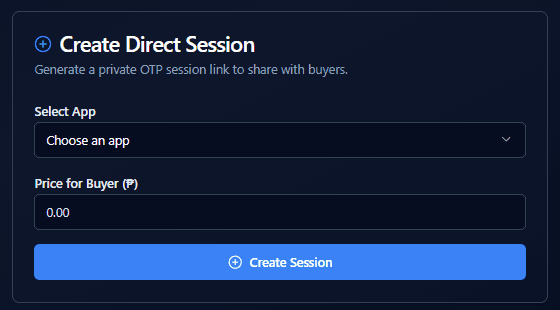
Step 1: Agent Creates a Direct Session
Agents can create a direct session by selecting an app and setting a custom price for buyers. This generates a unique session link that can be shared with buyers.
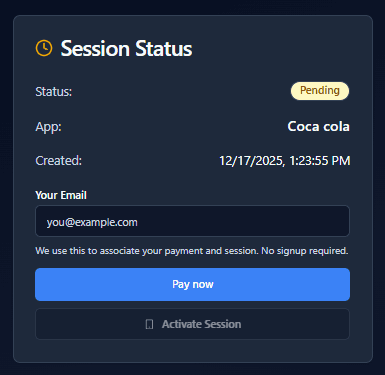
Step 2: Buyer Accesses the Session
Buyers receive the session link and can view the session status. They need to enter their email address and proceed with payment. The email is used to associate their payment and session - no signup required.
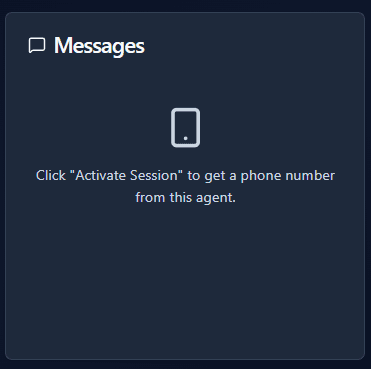
Step 3: OTP Messages Appear After Activation
Once payment is approved and the session is activated, OTP messages will appear in real-time. Buyers can copy the phone number and use it for verification in their target app.
Buyer Instructions
- Enter Your Email: Input your email address in the provided field. This email will be used to associate your payment and session. No signup is required.
- Click "Pay now": After entering your email, click the "Pay now" button to proceed with payment. You'll be redirected to the payment page where you can upload your payment receipt.
- Wait for Payment Approval: After submitting your payment, wait for the agent to approve it. The session status will update automatically once approved.
- Activate Session: Once payment is approved, the "Activate Session" button will become enabled. Click it to activate your session and receive a phone number.
- Receive OTP Messages: After activation, OTP messages will appear in real-time in the Messages section. You can copy the phone number and use it for verification in your target app.
Session Information
Active sessions can receive up to 1 OTP message for [App Name].
The session will automatically complete when:
- It receives 1 message (maximum limit reached)
- It expires and has received at least 1 message (expired with messages)
Note: If the session expires without receiving any messages, it will be marked as expired instead of completed.
Dynamic Limits: The maximum number of OTP messages and completion conditions are determined by the app selected by the agent. Each app may have different limits and requirements, similar to standard OTP sessions.
Additional Information
Session Expiration:
Sessions have a limited time window. Make sure to activate and use your session before it expires.
Payment Status:
You can track your payment status on the session page. The session can only be activated after payment approval.
Support:
If you encounter any issues, contact the agent who provided the session link or reach out to our support team.